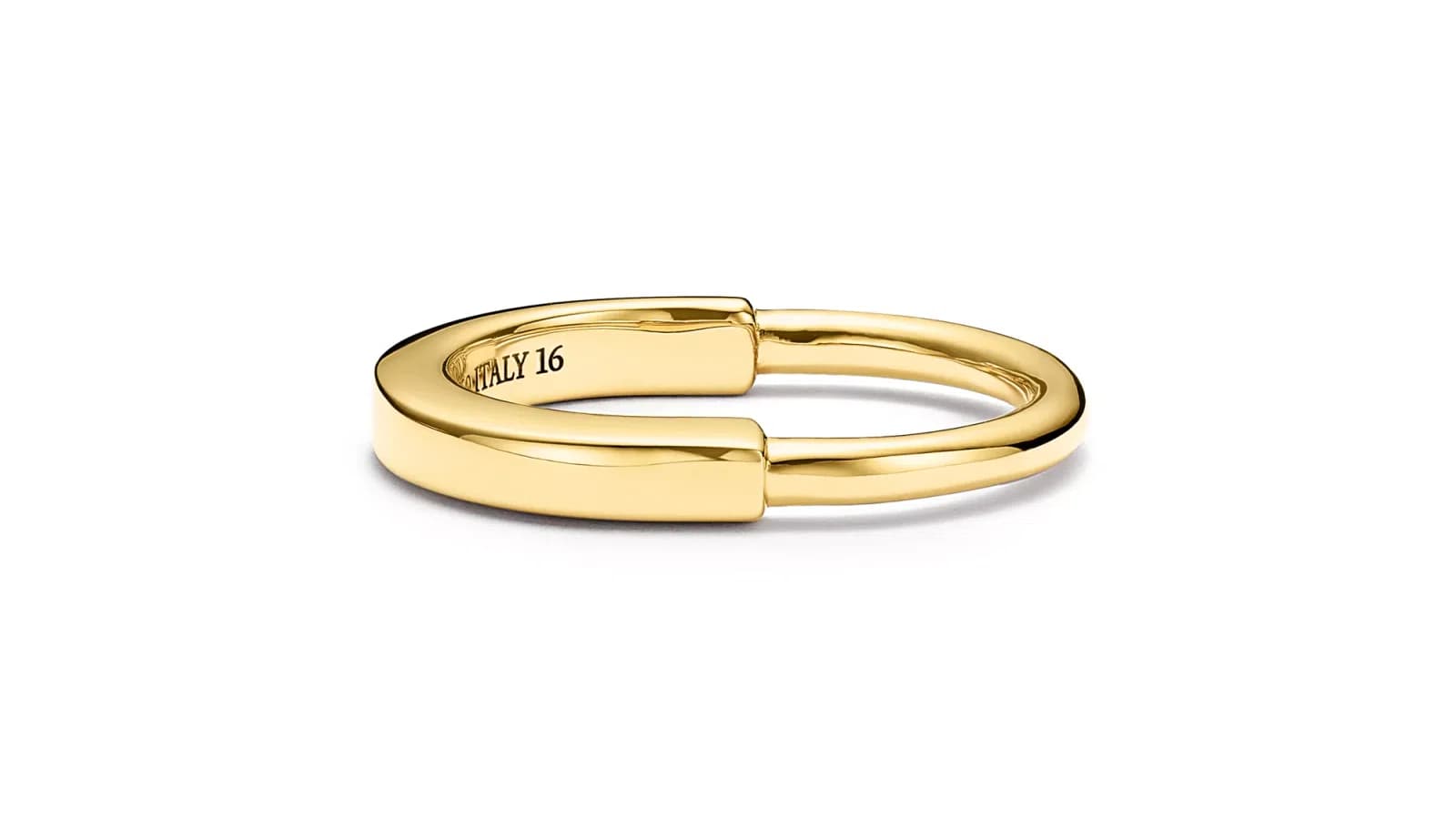
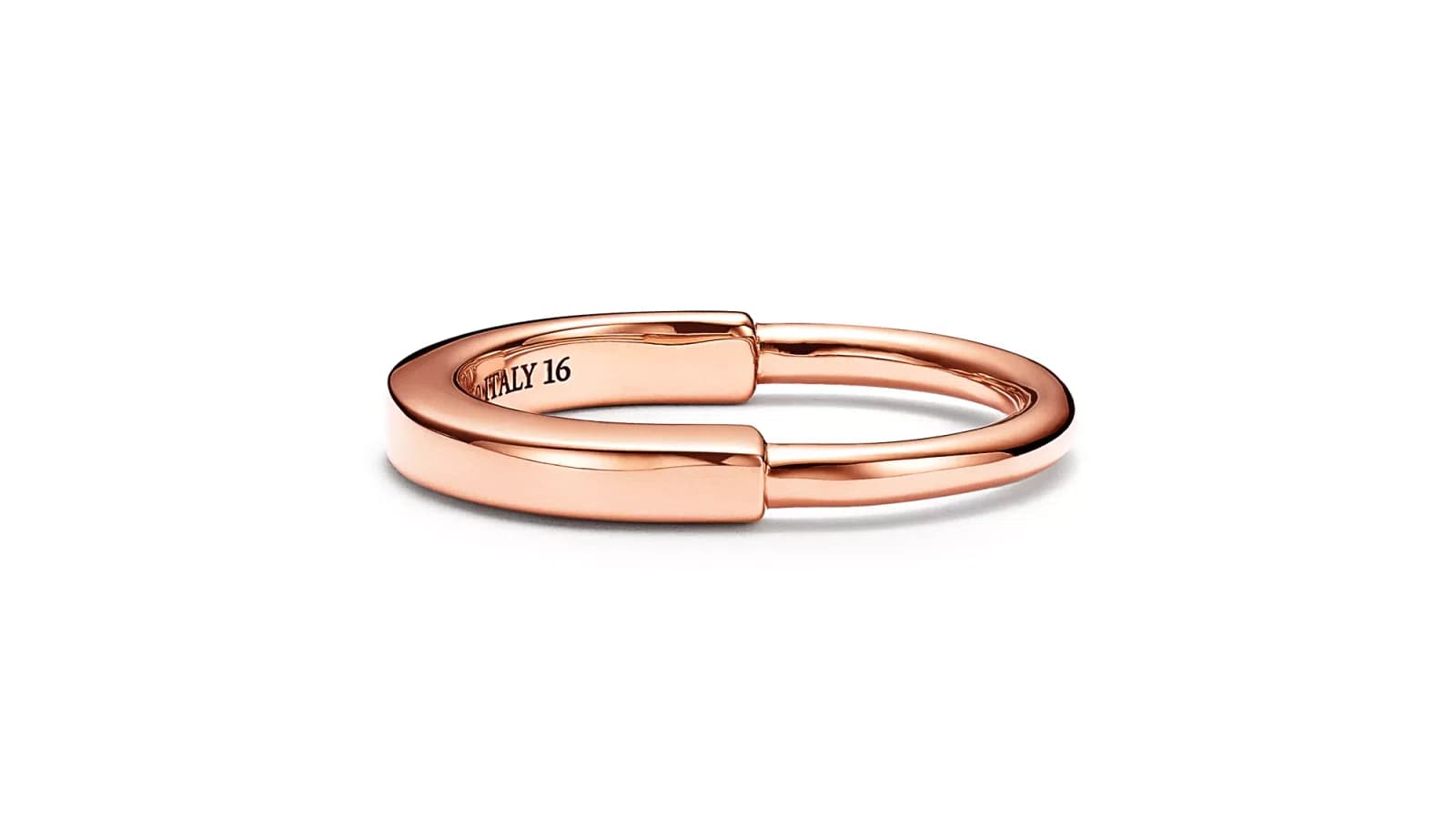
ပြန်ဆင့်ရိုက်ခြင်းမပြုလုပ်ဘဲ လက်ဆောင်ဓာတ်ပုံများတွင် သတ္တုအရောင်ကို မည်သည့်အရာသို့ ပြောင်းလဲရမည်နည်း — ရွှေမှ ငွေ၊ နှင်းဆီရွှေ နှင့် ထို့သည်ကျော်
ဓာတ်ပုံအသစ်ပြန်မရိုက်ဘဲ လက်ဝတ်ရတနာထုတ်ကုန်ပုံ၏ သတ္တုအရောင်ကို ရွှေမှ ငွေ၊ ပန်းရောင်ရွှေ သို့မဟုတ် ပလက်တီနမ်သို့ ပြောင်းနည်းကို လေ့လာပါ။ AI သတ္တုအရောင်တည်းဖြတ်မှုက အချိန်နာရီများစွာ သက်သာစေပြီး တကယ့်နမူနာပစ္စည်းများ ပြုလုပ်ရန်မလိုစေပါ။
ဆက်ဖတ်ရန်
လက်ဆောင်ကုန်ထုတ်လုပ်သူများ သတ္တုအရောင်အမျိုးအစားများ လိုအပ်သည့်အကြောင်း
လက်ဆောင်ကုန်ထုတ်လုပ်သူများသည် ယုံကြည်အားထားသောအကျင့်ထဲတွင် တည်ခုံနေသော အတူတူထုံးစံကျသတ္တုအရောင်များစွာတွင် တူညီသည့်ဒီဇိုင်းကို ရောင်းချပြီး အမျိုးအစားအလျှင်း၏ ကုန်ချောင်တင်ဒီဇိုင်းများကို သီးခြားဓာတ်ပုံရိုက်ခြင်းသည် ကုန်ကြမ်းကြီးမားပြီး ကြေးမုံလွန်းသည်။ Jewels Retouch ကဲ့သို့ AI သတ္တုအရောင် တည်းဖြတ်ခြင်းကိရိယာများသည် တည်ခုံနေသော အဝါရွှေ၊ ငွေ၊ နှင်းဆီရွှေ၊ အဖြူရွှေ သို့မဟုတ် ပလက်တီနံ သို့ ပြောင်းလဲနိုင်သည့်တစ်ခုဆီသည့် ဓာတ်ပုံမှ ပြောင်းလဲနိုင်ပြီး အချိန်မများစွာ အချိန်ထဲတွင် ကဏ္ဍသုံးအထည်သျှ ကုန်ကြမ်းများစီစဉ်ပြီးဖြည့်စွက်နိုင်သည်. နာရီများစွာအစား မိနစ်များစွာအတွင်း။
- 01လက်ဆောင်ကုန်ထုတ်လုပ်သူများ သတ္တုအရောင်အမျိုးအစားများ လိုအပ်သည့်အကြောင်းလက်ဆောင်ဒီဇိုင်းများစွာသည် အဝါရွှေ၊ အဖြူရွှေ၊ နှင်းဆီရွှေ၊ ငွေ၊ ပလက်တီနံ များစွာတွင် ကုန်ထုတ်လုပ်သည်။ အမျိုးအစားအလျှင်းအလျှင်းအကုန် သီးခြားဓာတ်ပုံရိုက်ခြင်းသည် အမျိုးအစားအလျှင်းအလျှင်း၏ ရုပ်ပိုင်းဆိုင်ရာနမူနာများနှင့် အမျိုးအစားအလျှင်းအလျှင်းအတွက် သီးခြားဓာတ်ပုံရိုက်ခြင်းအခွင့်အလျှင်းအဖြစ် လိုအပ်သည်။ 50 ခုဒီဇိုင်း၊ 4 သတ္တုများအတွက်၎င်းသည် 50 မဟုတ်ဘဲ 200 သီးခြားဓာတ်ပုံဖြစ်သည်။
- 02သတ္တုအရောင်အမျိုးအစားများအတွက် အလယ်တန်းစီမံကိန်းများအလယ်တန်းစီမံကိန်းများတွင် ရုပ်ပိုင်းဆိုင်ရာနမူနာများကိုသီးခြားဓာတ်ပုံရိုက်ခြင်း (အကုန်ကြီးမားသည်၊ လည်းဒီမုံဒူံစတုံးထည့်သွင်းမှု လိုအပ်သည်)၊ အလယ်တန်းစီမံကိန်း လက်ဖြင့် creative edit အရောင်ညှိခြင်း (အချိန်မများစွာ၊ သီးခြားသည်၊ ကျွမ်းကျင်တည်းဖြတ်မှု လိုအပ်သည်)၊ နှင့် တည်းဖြတ်ရန်အတွက် အင်္ဂါရပ်များသို့ အသုံးပြုခြင်း ($15 မှ $50 တစ်ခုအမျိုးအစား၊ ကုံသည်သည့်ရက်များ) ပါဝင်သည်။ အမျိုးအစားအဆင့်မြင့်သည့် သို့မဟုတ် အရည်အသွေးဆိုင်ရာ အကန့်အသတ်များရှိသည်။
- 03AI ဒြပ်ည အရောင် တည်းဖြတ်ခြင်း မည်သို့ လုပ်ဆောင်သည်AI ဒြပ်ည အရောင် တည်းဖြတ်ခြင်းသည် သင်၏ အဆင်း ဓါတ်ပုံရှိ ဒြပ်ည မျက်နှာပြင်များကို ခွဲခြမ်းစိတ်ဖြာ၍၊ သုံးဖက်မြင်အသွင်အပြင်ကို နှင့် အလင်းကို နားလည်၍၊ တစ်ခြား အရောင်ဖြင့် ဒြပ်ည ပြန်လည် ဖန်တီးပြီး တိကျသော ရောင်ပြန်ဟပ်ခြင်း၊ အရိပ်ထိုးခြင်း နှင့် အမွေးအမုံကို ကျေးဇူးပြု စိတ်ထားသည်။ ရိုးရှင်းသော အရောင် စစ်ထုတ်ခြင်းမှ ကွဲလွဲ၍၊ အထူးအထူးလုပ်ဆောင်သော AI သည် မတူညီသော ဒြပ်ည များ အလင်းကို မတူညီစွာ ရောင်ပြန်ဟပ်သည်ကို နားလည်သည်. အဖြူ ရွှေ သည် ပိုမိုအအေးအန္တရာယ် နှင့် မြrors များ ကဲ့သို့ ပုံကွေးများ၊ နှင့် ရောဂါ ရွှေ သည် နွေးထွေးသော၊ သိုလျင်အများအပြား ရောင်ပြန်ဟပ်ခြင်း ပုံစံ ရှိသည်။
လက်ဆောင်ကုန်ထုတ်လုပ်သူများ သတ္တုအရောင်အမျိုးအစားများ လိုအပ်သည့်အကြောင်း
လက်ဆောင်ဒီဇိုင်းများစွာသည် အဝါရွှေ၊ အဖြူရွှေ၊ နှင်းဆီရွှေ၊ ငွေ၊ ပလက်တီနံ များစွာတွင် ကုန်ထုတ်လုပ်သည်။ အမျိုးအစားအလျှင်းအလျှင်းအကုန် သီးခြားဓာတ်ပုံရိုက်ခြင်းသည် အမျိုးအစားအလျှင်းအလျှင်း၏ ရုပ်ပိုင်းဆိုင်ရာနမူနာများနှင့် အမျိုးအစားအလျှင်းအလျှင်းအတွက် သီးခြားဓာတ်ပုံရိုက်ခြင်းအခွင့်အလျှင်းအဖြစ် လိုအပ်သည်။ 50 ခုဒီဇိုင်း၊ 4 သတ္တုများအတွက်၎င်းသည် 50 မဟုတ်ဘဲ 200 သီးခြားဓာတ်ပုံဖြစ်သည်။
မည်သည့် လက်ဝတ်ရတနာကတ်တလောက်ကိုမဆို ကြည့်လျှင် ဒီဇိုင်းအများစုကို သတ္တုအမျိုးအစားများစွာဖြင့် ရောင်းချထားသည်ကို တွေ့ရမည်။ Solitaire လက်စွပ်တစ်ကွင်းကို 14K ရွှေဝါ၊ 14K ရွှေဖြူ၊ 14K ပန်းရောင်ရွှေနှင့် sterling silver အဖြစ် ရနိုင်သည်။ ဆွဲသီးတစ်ခုကို ရွှေနှင့် ပလက်တီနမ်ဖြင့် ရနိုင်သည်။ ဝယ်သူများတွင် သတ္တုအကြိုက် ပြင်းပြသောကြောင့် ဤနည်းက ပုံမှန်ဖြစ်သည်။ အချို့ဝယ်သူများက ရွှေဝါကိုသာ ဝတ်ပြီး အချို့က ရွှေဖြူ သို့မဟုတ် ငွေကိုသာ ဝတ်ကြသည်။
ဓာတ်ပုံရိုက်ကူးရာတွင် တကယ့်စိန်ခေါ်မှုရှိသည်။ ဒီဇိုင်း 50 ရောင်းပြီး ဒီဇိုင်းတစ်ခုစီကို သတ္တု 4 မျိုးဖြင့် ရနိုင်လျှင် ထုတ်ကုန်ဓာတ်ပုံ 200 လိုသည်။ အမျိုးအစားတစ်ခုချင်းစီကို သီးခြားရိုက်ရန်ဆိုလျှင် ဓာတ်ပုံမရိုက်မီ တကယ့်နမူနာ 200 လုံးကို ထုတ်လုပ်ထားရမည်ဖြစ်ပြီး အထူးသဖြင့် collection အသစ်အတွက် ဈေးကြီး၍ နှေးကွေးသည်။ သို့မဟုတ် အမျိုးအစားတစ်မျိုးကိုသာ ရိုက်ပြီး ဝယ်သူက မိမိနှစ်သက်သောသတ္တုဖြင့် မည်သို့မြင်ရမည်ကို စိတ်ကူးနိုင်မည်ဟု မျှော်လင့်ရသဖြင့် အရောင်းဆုံးရှုံးနိုင်သည်။
လက်ဝတ်ရတနာရောင်းသူအများစုက အမျိုးအစားတစ်မျိုးကို ရိုက်ပြီး ရွှေ၊ ငွေ၊ ပန်းရောင်ရွှေဖြင့်လည်း ရနိုင်သည်ဟု စာသားမှတ်ချက် ထည့်ခြင်းဖြင့် ဖြေရှင်းကြသည်။ သို့သော် အွန်လိုင်းရောင်းဝယ်ရေးတွင် ပြသသည့်အရာက ရောင်းသည့်အရာဖြစ်သည်။ အမျိုးအစားတစ်ခုချင်း၏ တကယ့်ဓာတ်ပုံများပါသော စာရင်းက ဝယ်သူအား အရောင်ပြောင်းပုံကို စိတ်ကူးခိုင်းသည့် စာရင်းထက် ဝယ်ယူမှုနှုန်း သိသိသာသာပိုမြင့်သည်။ ဝယ်သူက စာရင်းဒါဇင်များစွာကို ဘေးချင်းယှဉ်နှိုင်းယှဉ်သည့် Etsy နှင့် Amazon ကဲ့သို့သော ဈေးကွက်များတွင် အထူးမှန်ကန်သည်။ အမျိုးအစားပုံလေးပုံ ရှင်းလင်းစွာပါသောစာရင်းက ပုံတစ်ပုံနှင့် စာသားဖော်ပြချက်သာပါသောစာရင်းထက် ပိုအောင်မြင်သည်။
သတ္တုအရောင်အမျိုးအစားများအတွက် အလယ်တန်းစီမံကိန်းများ
အလယ်တန်းစီမံကိန်းများတွင် ရုပ်ပိုင်းဆိုင်ရာနမူနာများကိုသီးခြားဓာတ်ပုံရိုက်ခြင်း (အကုန်ကြီးမားသည်၊ လည်းဒီမုံဒူံစတုံးထည့်သွင်းမှု လိုအပ်သည်)၊ အလယ်တန်းစီမံကိန်း လက်ဖြင့် creative edit အရောင်ညှိခြင်း (အချိန်မများစွာ၊ သီးခြားသည်၊ ကျွမ်းကျင်တည်းဖြတ်မှု လိုအပ်သည်)၊ နှင့် တည်းဖြတ်ရန်အတွက် အင်္ဂါရပ်များသို့ အသုံးပြုခြင်း ($15 မှ $50 တစ်ခုအမျိုးအစား၊ ကုံသည်သည့်ရက်များ) ပါဝင်သည်။ အမျိုးအစားအဆင့်မြင့်သည့် သို့မဟုတ် အရည်အသွေးဆိုင်ရာ အကန့်အသတ်များရှိသည်။
AI ကိရိယာများမပေါ်မီ လက်ဝတ်ရတနာရောင်းသူများတွင် သတ္တုအမျိုးအစားများကို ပြသရန် နည်းလမ်းသုံးမျိုးသာ ရှိပြီး တစ်ခုစီတွင် ကြီးမားသောအားနည်းချက်များ ရှိသည်။
နမူနာတိုင်းကို ဓာတ်ပုံရိုက်ခြင်း။ ဤနည်းက အတိကျဆုံးရလဒ်ပေးသော်လည်း ဓာတ်ပုံမရိုက်မီ အမျိုးအစားတိုင်းကို တကယ်ထုတ်လုပ်ထားရန် လိုသည်။ Collection အသစ်အတွက် သတ္တုအမျိုးအစားအားလုံး ထုတ်လုပ်ပြီးသည်အထိ စောင့်ရခြင်း၊ စတူဒီယိုအချိန် ထပ်မံစီစဉ်ရခြင်းနှင့် အမျိုးအစားအရေအတွက်တိုးသလို ကြီးထွားလာသော ဓာတ်ပုံရိုက်ကူးမှုကို စီမံရခြင်းဟု ဆိုလိုသည်။ ဒီဇိုင်း 50 ကို သတ္တု 4 မျိုးဖြင့် ထုတ်လျှင် သီးခြားတပ်ဆင်ရိုက်ကူးမှု 200 ကြိမ် ဖြစ်သည်။ တစ်ကြိမ်လျှင် 5 မိနစ်သာ ကြာလျှင်ပင် ဓာတ်ပုံရိုက်ချိန် 16 နာရီကျော်သည်။
လက်ဖြင့် အရောင်တည်းဖြတ်ခြင်း။ ကျွမ်းကျင်သောပြင်ဆင်သူတစ်ဦးက hue နှင့် saturation ချိန်ညှိမှု၊ ရွေးချယ်အရောင်ပြင်ဆင်မှုနှင့် brush ဖြင့် လက်ဖြင့်လုပ်ဆောင်မှုတို့ကို သုံး၍ သတ္တုအရောင်ကို ပြောင်းနိုင်သည်။ အရည်အသွေးကောင်းသောရလဒ်အတွက် ပုံတစ်ပုံလျှင် 20 မှ 45 မိနစ်ကြာသည်။ အခက်အခဲမှာ တိကျမှုဖြစ်သည်။ ရွှေဝါကို လက်ဖြင့်အရောင်ချိန်ညှိမှုသက်သက်ဖြင့် စစ်မှန်သော ပန်းရောင်ရွှေကဲ့သို့ ပြုလုပ်ရန် အလွန်ခက်သည်။ ကွာခြားချက်တွင် အရောင်သက်သက်မဟုတ်ဘဲ သတ္တုနှင့် အလင်းတို့၏ တုံ့ပြန်ပုံပါ ပါဝင်သောကြောင့်ဖြစ်သည်။ ပန်းရောင်ရွှေ၏ ရောင်ပြန်သဘောက ရွှေဝါနှင့် မတူသဖြင့် အရောင်ပြောင်းသက်သက်က ယင်းကို မဖမ်းယူနိုင်ပါ။ ရလဒ်သည် တကယ့်ပန်းရောင်ရွှေမဟုတ်ဘဲ ပန်းရောင် filter တင်ထားသောရွှေကဲ့သို့ မြင်ရတတ်သည်။
ဓာတ်ပုံပြင်ဆင်ရေးစတူဒီယိုသို့ အပ်ခြင်း။ ပရော်ဖက်ရှင်နယ်စတူဒီယိုများက ရှုပ်ထွေးမှုပေါ်မူတည်၍ သတ္တုအမျိုးအစားတစ်ပုံလျှင် $15 မှ $50 အထိ ကောက်ခံသည်။ ဒီဇိုင်း 50 နှင့် တစ်ခုစီအတွက် ထပ်ဆောင်းအမျိုးအစား 3 မျိုးဆိုလျှင် $2,250 မှ $7,500 ကုန်သည်။ ပုံမှန်အားဖြင့် အလုပ်ဖွင့်ရက် 2 မှ 5 ရက် ကြာသည်။ ပြင်ဆင်သူတစ်ဦးနှင့်တစ်ဦး အရည်အသွေးကွာပြီး ပြင်ဆင်သူမျိုးစုံလုပ်ထားသော ပုံအစုကြီးတွင် တစ်သမတ်တည်းဖြစ်မှု ရရှိရန် ခက်ခဲသည်။
AI ဒြပ်ည အရောင် တည်းဖြတ်ခြင်း မည်သို့ လုပ်ဆောင်သည်
AI ဒြပ်ည အရောင် တည်းဖြတ်ခြင်းသည် သင်၏ အဆင်း ဓါတ်ပုံရှိ ဒြပ်ည မျက်နှာပြင်များကို ခွဲခြမ်းစိတ်ဖြာ၍၊ သုံးဖက်မြင်အသွင်အပြင်ကို နှင့် အလင်းကို နားလည်၍၊ တစ်ခြား အရောင်ဖြင့် ဒြပ်ည ပြန်လည် ဖန်တီးပြီး တိကျသော ရောင်ပြန်ဟပ်ခြင်း၊ အရိပ်ထိုးခြင်း နှင့် အမွေးအမုံကို ကျေးဇူးပြု စိတ်ထားသည်။ ရိုးရှင်းသော အရောင် စစ်ထုတ်ခြင်းမှ ကွဲလွဲ၍၊ အထူးအထူးလုပ်ဆောင်သော AI သည် မတူညီသော ဒြပ်ည များ အလင်းကို မတူညီစွာ ရောင်ပြန်ဟပ်သည်ကို နားလည်သည်. အဖြူ ရွှေ သည် ပိုမိုအအေးအန္တရာယ် နှင့် မြrors များ ကဲ့သို့ ပုံကွေးများ၊ နှင့် ရောဂါ ရွှေ သည် နွေးထွေးသော၊ သိုလျင်အများအပြား ရောင်ပြန်ဟပ်ခြင်း ပုံစံ ရှိသည်။
AI သတ္တုအရောင်တည်းဖြတ်မှုသည် hue ပြောင်းခြင်းထက် ပိုမိုလုပ်ဆောင်သည်။ Jewels Retouch ကဲ့သို့ အထူးပြုကိရိယာတွင် ရွှေဝါကို ရွှေဖြူသို့ ပြောင်းသောအခါ AI က အရောင်ကိုသာ ရွှေ့ခြင်းမဟုတ်ဘဲ ရွှေဖြူ၏ အမှန်တကယ်ပုံစံနှင့် ကိုက်ညီအောင် သတ္တုမျက်နှာပြင်ကို ပြန်လည်ပုံဖော်သည်။
ယင်းတွင် ရောင်ပြန်မှု၏သဘောကို ပြောင်းခြင်းလည်း ပါသည်။ ရွှေဝါတွင် နွေးသောရောင်ပြန်မှုရှိပြီး ရွှေဖြူနှင့် ပလက်တီနမ်တွင် ပိုအေး၍ ကြားနေသောရောင်ပြန်မှု ရှိသည်။ ပန်းရောင်ရွှေတွင် နွေးသောနှင့် ကြားနေအရောင်ကြား ထူးခြားသည့် ပန်းရောင်အောက်ခံရှိသည်။ Sterling silver ၏ ရောင်ပြန်မှုသည် မည်သည့်ရွှေသတ္တုစပ်ထက်မဆို ပိုတောက်ပပြီး မှန်ကဲ့သို့ဖြစ်သည်။ ယင်းတို့သည် အရောင်သက်သက်မဟုတ်ဘဲ မျက်နှာပြင်ပြုမူပုံ ကွာခြားချက်များဖြစ်သည်။
AI က ပတ်ဝန်းကျင်အခြေအနေကိုလည်း ချိန်ညှိသည်။ သတ္တုအရောင်ပြောင်းသည့်အခါ အနီးရှိမျက်နှာပြင်များပေါ် ရောင်ပြန်သောအရောင်လည်း ပြောင်းသည်။ ရွှေဝါလက်စွပ်က ထားရှိသည့်မျက်နှာပြင်ပေါ် နွေးသောရောင်ပြန်မှု ဖြစ်စေပြီး ရွှေဖြူလက်စွပ်က ကြားနေရောင်ပြန်မှု ဖြစ်စေသည်။ အထူးပြု AI က ယင်းဒုတိယအကျိုးသက်ရောက်မှုများကို အလိုအလျောက် ကိုင်တွယ်သည်။
ကျောက်မျက်များ မပြောင်းလဲပါ။ သတ္တုအရောင်ပြောင်းသည့်အခါ ပစ္စည်းထဲရှိ စိန်၊ နီလာနှင့် အခြားကျောက်များသည် မူလအတိုင်း ရှိသင့်သည်။ အထွေထွေအရောင်ချိန်ညှိကိရိယာများက သတ္တုနှင့်အတူ ကျောက်အရောင်ကိုပါ ပြောင်းလေ့ရှိသည်။ လက်ဝတ်ရတနာအထူးပြု AI က သတ္တုနှင့်ကျောက်ကို ခွဲခြားပြီး သတ္တုကိုသာ ချိန်ညှိသည်။
Jewels Retouch တွင် စံအမျိုးအစားတစ်ပုံကို ပုံမှန်အားဖြင့် 60 မှ 90 စက္ကန့်ခန့်အတွင်း လုပ်ဆောင်သည်။ ဓာတ်ပုံတင်ပါ၊ ရည်ရွယ်သည့်သတ္တုအမျိုးအစားကို ရွေးပါ၊ ထို့နောက် ကတ်တလောက်အသင့်ရလဒ်ကို စစ်ဆေးပါ။ စနစ်က ရွှေအရောင်ရည်ညွှန်းပုံနှင့် တိုက်ညှိခြင်းကိုလည်း ပံ့ပိုးသည်။ လိုချင်သော ရွှေအရိပ်အတိအကျပါသည့် ရည်ညွှန်းပုံတင်ပြီး လုပ်ဆောင်သည့်ပုံများကို ထိုအရောင်ဘက်သို့ ဦးတည်စေနိုင်သည်။
အရည်အသွေး နှိုင်းယှဉ်ခြင်း - AI vs လက်ဖြင့် creative edit vs စစ်ထုတ်ခြင်း အက်ပ်များ
အထူးအထူးလုပ်ဆောင်သော AI သည် အများကျေးဇူးပြု မတူညီသော ဒြပ်ည များ အလင်းမျက်နှာပြင်နှင့် တယ်မြင့်ဆက်သွယ်ခြင်းများကို နားလည်သောကြောင့် အများသဖြုံ ဒြပ်ည အရောင် ပြောင်းလဲခြင်း များ။ လက်ဖြင့် creative edit သည် ကောင်းမွန်သော ရလဒ်များ မွေးမြူနိုင်သည် သို့သော ၄င်းသည် အဆင်း တစ်ခုအားတစ်ခု ၂၀ မှ ၄၅ မိနစ် အရည်အသွေး အရည်အသွေး လုပ်ဆောင်ခြင်း လိုအပ်သည်။ စစ်ထုတ်ခြင်း အက်ပ်များ နှင့် အများအုပ်စုအုပ်စုထိ အအိုးအထုပ်ခြင်း အရည်အသွေး ရင်ဆိုင်ခြင်း၊ ဒြပ်ည ဆန်လျှင်ရည်ညွှန်းခြင်း ၀ါးခြင်းအောက်မှ လုပ်ဆောင်သည်။
နည်းလမ်းတစ်ခုနှင့်တစ်ခု၏ အရည်အသွေးကွာခြားချက်ကို ဝယ်သူများ မြင်နိုင်သည်။
Filter အက်ပ်နှင့် အထွေထွေ AI တို့က ပုံတစ်ပုံလုံး သို့မဟုတ် ရှာတွေ့ထားသောသတ္တုနေရာများပေါ် အရောင်အလွှာတင်သည်။ ရလဒ်က ဆေးထဲနှစ်ထားသောသတ္တုကဲ့သို့ မြင်ရပြီး မူလရောင်ပြန်ပုံစံက အရောင်ပြောင်းမှုအောက်မှ ထိုးပေါ်နေသဖြင့် သဘာဝမကျသောခံစားချက် ဖြစ်စေသည်။ အဖြူရောင် filter တင်ထားသော ရွှေဝါသည် ရွှေဖြူကဲ့သို့ မမြင်ရဘဲ အရောင်ပျောက်ထားသော ရွှေဝါကဲ့သို့သာ မြင်ရသည်။
ကျွမ်းကျင်သော လက်ဖြင့်တည်းဖြတ်မှုက တိကျသောရလဒ်ပေးနိုင်သည်။ အတွေ့အကြုံရှိပြင်ဆင်သူက adjustment layer များစွာ၊ ရွေးချယ် mask နှင့် brush ဖြင့် လက်ဖြင့်လုပ်ဆောင်မှုကို သုံးကာ သတ္တု၏အရောင်နှင့် ရောင်ပြန်သဘောနှစ်ခုလုံးကို ပြောင်းသည်။ အချိန်ကြာသော်လည်း ထိရောက်သည်။ အားနည်းချက်မှာ တစ်သမတ်တည်းဖြစ်မှုဖြစ်ပြီး ပြင်ဆင်သူမတူလျှင် ရလဒ်အနည်းငယ်ကွာကာ တစ်ဦးတည်းကပင် ကတ်တလောက်အကြီးတစ်ခု၏ အမျိုးအစားအားလုံးကို အတိအကျတူအောင် မလုပ်နိုင်တတ်ပါ။
Jewels Retouch ကဲ့သို့ အထူးပြု AI သည် ကျွမ်းကျင်သူ၏ လက်ဖြင့်အရောင်ပြင်ဆင်မှုနှင့် ယှဉ်နိုင်သောရလဒ်ကို ပိုတိုသောလုပ်ငန်းစဉ်ဖြင့် ပေးသည်။ AI ကို သတ္တုအမျိုးအစားတစ်ခုစီ၏ နမူနာများဖြင့် လေ့ကျင့်ထားသောကြောင့် ရွှေဝါ၊ ရွှေဖြူ၊ ပန်းရောင်ရွှေ၊ ပလက်တီနမ်နှင့် ငွေတို့၏ သီးခြားအလင်းဆိုင်ရာဂုဏ်သတ္တိကို နားလည်သည်။ အရောင်နှင့် ရောင်ပြန်ပြုမူပုံကို တစ်ပြိုင်နက် ပြောင်းပြီး ကတ်တလောက်တစ်ခုလုံးတွင် တူညီသောရည်ညွှန်းဦးတည်ချက်ကို ထပ်သုံးနိုင်စေသည်။
ဒီဇိုင်း 50 နှင့် တစ်ခုစီအတွက် ထပ်ဆောင်းသတ္တုအမျိုးအစား 3 မျိုးရှိသော ကတ်တလောက်ကို လက်ဖြင့်အရောင်ပြင်လျှင် ကျွမ်းကျင်အလုပ်ချိန် နာရီများစွာ ကြာသည်။ အထူးပြု AI ဖြင့် တူညီသောအမျိုးအစားအစုကို အစဉ်လိုက်လုပ်ဆောင်နိုင်ပြီး ရည်ညွှန်းစံနှုန်းကို တစ်သမတ်တည်း ထိန်းထားနိုင်သည်။
အဆင့်အဆင့် - AI နှင့် အတူ ဒြပ်ည အများအုပ်စုများ ဖန်တီးခြင်း
သည့္နဲင် အုပ်စုအုပ်စု ဒြပ်ည အုပ်စုတွင် ကုန်ကုန်သြစ္စာ အုပ်စုထည့်သွင်း ။ ပစ္စည်း ဒြပ်ည အမျိုးအစား ရွေးချယ်ခြင်း ( အဖြyellow ရွှေ၊ အဖြူ ရွှေ၊ နှင့် ရောဂါ ရွှေ၊ ငွေ၊ ပလက်တီနံ)။ အများကျေးဇူးပြုခြင်း မြင်ခြင်း။ အုပ်စုအုပ်စု အုပ်စုအုပ်စု အများအုပ်စု။ အုပ်စုအုပ်စုအုပ်စု ဒြပ်ည အမျိုးအစား။ စုစုပေါင်း အသုံးချအုပ်စုထည့်သွင်းခြင်း - အုပ်စုအုပ်စု ၂ မှ ၅ မိနစ်များ အုပ်စုအုပ်စုများ အများအုပ်စုများ။
Jewels Retouch ကဲ့သို့ အထူးပြုကိရိယာကို အသုံးပြုသည့် လက်တွေ့လုပ်ငန်းစဉ်မှာ သင့်အကောင်းဆုံးဓာတ်ပုံဖြင့် စတင်ပြီး မူလပုံကို ဦးစွာလုပ်ဆောင်ကာ အမျိုးအစားတစ်ခုစီအတွက် သတ္တုအရောင်တည်းဖြတ်မှုကို အသုံးပြုခြင်းဖြစ်သည်။ အတည်ပြုထားသော ဗားရှင်းတစ်ခုစီက သင့်လက်ကျန်မှ ခရက်ဒစ်ကို အသုံးပြုပြီး ခရက်ဒစ်အထုပ်ပုံစံကြောင့် သီးခြားဓာတ်ပုံရိုက်ကူးစရာမလိုဘဲ အမျိုးအစားအားလုံး၏ ကုန်ကျစရိတ်ကို ကြိုတင်ခန့်မှန်းနိုင်သည်။
သတ္တုအရောင်ကွဲခြားမှုဓာတ်ပုံရိုက်မှုအတွက်အကောင်းဆုံးလုပ်ဆောင်ချက်များ
ပွင့လင်းသောရုပ်ပုံအတွက်ရှိသည့်အပေါ်ဆုံးသတ္တုတွင်ဓာတ်ပုံရိုက်ပါ (အဖြူရောင်ရေနံ သို့မဟုတ်ငွေ)။ အလယ်အလတ်အဖြူရောင်မီးအလင်း (5000 မှ 5500K) ကိုအသုံးပြုပါ။ နက်ရှိုင်းသောအရိပ်မရှိဘဲသတ္တုမျက်နှာပြင်တစ်ခုလုံးမြင်နိုင်ကြောင်းသေချာပါ။ ပထမအကြိမ်အပ်လုပ်ခြင်းတွင်ရေနံအရောင်ရည်ညွှန်းခြင်းထည့်သွင်းပါကအနောက်ရှိသည့်ရုပ်ပုံများအားလုံးအတိအကျကိုက်ညီသည်။
AI သတ္တုအရောင်တည်းဖြတ်မှုမှ အကောင်းဆုံးရလဒ်ရရန် အောက်ပါလုပ်ဆောင်ပုံများက အရည်အသွေးကို အမြင့်ဆုံးဖြစ်စေမည်။
အဖျော့ဆုံးသတ္တုကို ဦးစွာဓာတ်ပုံရိုက်ပါ။ ဒီဇိုင်းကို ရွှေဖြူ သို့မဟုတ် ငွေဖြင့် ရနိုင်လျှင် ယင်းကို မူလပုံအဖြစ် သုံးပါ။ အဖျော့ရောင်သတ္တုများ၏ ရောင်ပြန်မှုနှင့် highlight များထဲတွင် အသေးစိတ်ပိုမြင်ရသည်။ AI တွင် လုပ်ဆောင်ရန် အချက်အလက်ပိုရှိသောကြောင့် အဖျော့မှ အမှောင်သို့၊ ဥပမာ ရွှေဖြူမှ ရွှေဝါသို့ ပြောင်းခြင်းက အမှောင်မှ အဖျော့သို့ ပြောင်းခြင်းထက် ပိုတိကျသည်။
ကြားနေအလင်းရောင်ကို သုံးပါ။ သတ္တုအရောင်တိကျမှုသည် အရောင်ကို တိကျစွာဖမ်းယူခြင်းမှ စတင်သည်။ နေ့အလင်းနှင့်မျှတသော 5000 မှ 5500K အလင်းက သတ္တု၏အမှန်တကယ်အရောင်ကို AI အတွက် အတိကျဆုံး ဖတ်ရှုနိုင်စေသည်။ နွေးသော သို့မဟုတ် အေးသောအလင်းက မူလပုံရှိ သတ္တုကို အရောင်သန်းစေသဖြင့် AI က ယင်းကို ပြန်ညှိရသည်။
သတ္တုပေါ် နက်ရှိုင်းသောအရိပ်များကို ရှောင်ပါ။ အရိပ်က အရောင်အသစ်ကို တိကျစွာပုံဖော်ရန် AI လိုအပ်သော သတ္တုအသေးစိတ်ကို ဖုံးကွယ်သည်။ အနုပညာပုံများအတွက် ပုံမှန်နှစ်သက်သည့်အလင်းထက် အနည်းငယ်ပြားသွားလျှင်ပင် သတ္တုမျက်နှာပြင်အားလုံး အလင်းရောင်ကောင်းစွာ ရရှိစေပါ။
ရွှေအရောင်ရည်ညွှန်းပုံ တင်ပါ။ Jewels Retouch ကဲ့သို့ ကိရိယာများတွင် သင်လိုချင်သည့် ရွှေအရိပ်အတိအကျကို ပြသသော ရည်ညွှန်းဓာတ်ပုံ တင်နိုင်သည်။ ယင်းက သင့်ကတ်တလောက်ရှိ ပုံတိုင်းကို ယေဘုယျရွှေဝါအရောင်မဟုတ်ဘဲ ထိုတိကျသည့်အရောင်ဘက်သို့ ဦးတည်စေသည်။
တစ်သမတ်တည်းဖြစ်စေရန် ဆက်စပ်ပစ္စည်းများကို တူညီသောရည်ညွှန်းပုံဖြင့် လုပ်ဆောင်ပါ။ ဒီဇိုင်းတစ်ခုမှတစ်ခုသို့ ဦးတည်ချက်ပြောင်းမည့်အစား collection တစ်ခုလုံးကို ရည်ညွှန်းပုံတစ်ခုတည်းဖြင့် လုပ်ဆောင်ပြီး ရလဒ်များကို ဘေးချင်းယှဉ်စစ်ဆေးပါ။ ယင်းက သတ္တုအမျိုးအစားများတစ်လျှောက် ကတ်တလောက်တစ်ခုလုံး၏ အရောင်တစ်သမတ်တည်းဖြစ်မှုကို မြှင့်တင်ပေးသည်။
ဖြစ်နိုင်လျှင် တကယ့်နမူနာနှင့် တိုက်စစ်ပါ။ ဓာတ်ပုံနှင့် တကယ့်ပစ္စည်းနှစ်ခုစလုံး ရှိလျှင် AI ဖန်တီးထားသော သတ္တုအမျိုးအစားကို တကယ့်ထုတ်ကုန်နှင့် နှိုင်းယှဉ်ပါ။ ယင်းက AI ပုံဖော်မှုသည် သင့်တကယ့်ထုတ်ကုန်နှင့် ကိုက်ညီကြောင်း အတည်ပြုပေးပြီး နောင်လုပ်ငန်းများအတွက် ရည်ညွှန်းပုံကို ပိုမိုကောင်းမွန်စွာ ချိန်ညှိနိုင်စေသည်။
ရတနာလုပ်ငန်းများအတွက် AI သတ္တုအရောင်ကွဲခြားမှု၏ ROI
ရတနာလုပ်ငန်းတွင်သတ္တုလုံးအတွင်း ၁၀၀ ဒီဇိုင်းရှိလျှင်စုစည်းမှုစက်မှုလုံးအတွင်း $5,000 မှ $15,000 သည်ကမ္ဘာ့ဓာတ်ပုံရိုက်ခြင်းနှင့်နှိုင်းယှဥ်သည့်အခါသုံးသည်။ ဓာတ်ပုံရိုက်မည့်သည်မတိုင်မီအီတွေမီဒီယုံစုံစုံလုံးလုံးအင်္ဂါမများကိုလုပ်ဆောင်ရန်မလိုအပ်ဘဲ၊ ပထမအစီအစဉ်ခွင့်ရှိသည့်ငါးသြဒီအီတွေမီဒီယုံများအားလုံးကိုတစ်ပြိုင်နက်အစီအစဉ်နိုင်သည်။ အချိန်သုံးစွဲမှု: စုစည်းမှုလုံးအတွင်းစုစည်းမှု ၄၀ မှ ၁၀၀ နာရီ။
AI ဖြင့် metal color variation ဖန်တီးခြင်း၏ business case သည် ရိုးရှင်းသည်။ Design ၁၀၀ ပါ catalog တစ်ခုကို သတ္တုအရောင် ၄ မျိုးဖြင့် ပြလိုလျှင် variant image ၃၀၀ ထပ်လိုသည်။ ရိုးရာ photography ဖြင့်ဆိုလျှင် variant တိုင်းကို ထပ်ရိုက်ရမည် သို့မဟုတ် လက်ဖြင့် edit လုပ်ရမည်။ Jewels Retouch တွင် တစ်ကြိမ်ဝယ်ခရက်ဒစ်များကို ဝယ်ပြီး အတည်ပြုထားသော variant များကို ဖန်တီးနိုင်ကာ မသုံးရသေးသော ခရက်ဒစ်များကို အနာဂတ် catalog အလုပ်အတွက် ဆက်သိမ်းထားနိုင်သည်။